> For the complete documentation index, see [llms.txt](https://tradesync.gitbook.io/tradesync/llms.txt). Markdown versions of documentation pages are available by appending `.md` to page URLs; this page is available as [Markdown](https://tradesync.gitbook.io/tradesync/overview.md).
# Overview
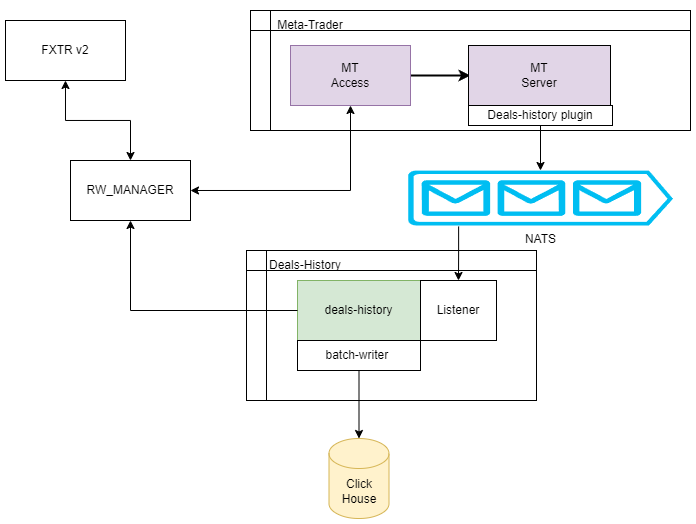
The main purpose of the system TradeSync is to get data on transactions and prices of trading instruments from MT in real-time mode. You can see the main diagram of the system:
The product is focused on the communication of the trading platform MT4-MT5 for the implementation of trading operations functions such as:
* creating an account;
* changing the trading account conditions;
* making balance operations;
* collecting the information about trading activity on trading accounts.
The product is consists of the following parts:
[Rw Manager MT5](/tradesync/rw-manager-mt5.md)
RWManager is a proxy-module that ensures the interaction of requests with the trade server and provides a change in the account status, the flow of prices from the trade server to the client application.
[FXTR v2](/tradesync/fxtr-v2.md)
FXTR v2 is a proxy-module for authorizing user requests for managing accounts on trading servers, obtaining information on transactions and opening/modifying/closing deals on trading servers. the module is supplied in version 2 and has the following entrypoints:
1. Manage accounts:
* Get information about instruments available for account type
* Create accounts with different types
* Update account parameters
* Get a list of open positions for the account
2. Get transactions
* Get a list of transactions for the account
* Get detail information about specified transaction
3. Getting balance information
4. Change balance
5. Open stream for the account
[DealsHistory](/tradesync/dealshistory.md)
DealsHistory is a service that directly works with RWmanager and NATS to get all deals from MT5 on real-time and send it all via BatchWriter to ClickHouse.
It is important that RW-Manager gets data from Meta-Trader, RWManager is a proxy-module between Meta-Trader and DealsHistory that processes data and vizualise it.
Note: all time used in documentation is on Unix time format.
### Low-level diagram of a possible system infrastructure:
.png?alt=media&token=63086686-4ebd-45a8-98d9-cedd9e5a672c)